

Appearance
Patient Appointment Queue Management
Queue Management helps organize patient flow in real time by assigning queue numbers, tracking positions, and estimating wait times.
It ensures a smooth consultation flow and reduces waiting confusion for both patients and staff.
Where It Works
Queue Management is integrated within:
Home → Healthcare → Patient Appointment
It becomes active when a patient is Checked In.
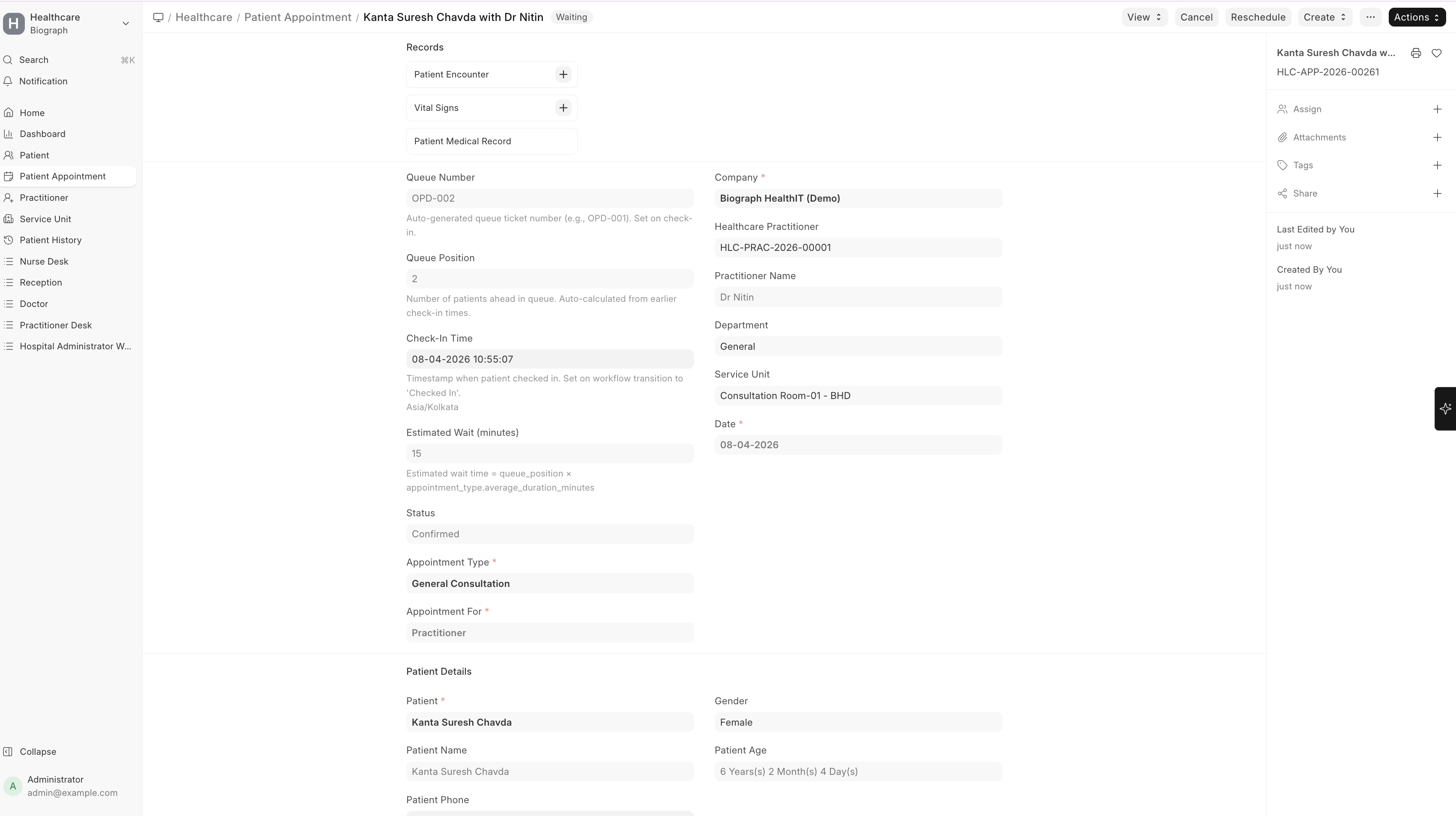
How Queue is Generated
When a patient checks in:
- A Queue Number is automatically assigned (e.g., OPD-001)
- The patient is added to the doctor’s queue
- Queue Position is calculated based on check-in time
- Estimated Wait Time is auto-calculated
- Queue is maintained per practitioner and per date
Queue Fields
| Field | Description |
|---|---|
| Queue Number | Unique token number for the patient (auto-generated) |
| Queue Position | Patient’s position in the queue |
| Check-In Time | Time when patient arrives and is checked in |
| Estimated Wait (minutes) | Calculated wait time based on queue |
| Status | Current appointment status (Waiting, In Consultation, Completed, etc.) |
Queue Workflow
Patient flow follows this sequence:
Scheduled → Checked In → Waiting → In Consultation → Completed
Status Meaning
| Status | Description |
|---|---|
| Checked In | Patient has arrived |
| Waiting | Patient is in queue |
| In Consultation | Doctor is currently seeing the patient |
| Completed | Consultation finished |
| Cancelled / No Show | Patient did not attend |
Queue Calculation Logic
Queue is built based on Check-In Time (FIFO logic)
Earlier check-in = higher priority
Queue is recalculated automatically whenever there is a change in patient status, such as:
- A patient is moved to consultation
- An appointment is completed or cancelled
Estimated Wait Time
Estimated wait time is calculated as:
Queue Position × Average Consultation Duration
Average consultation duration is derived from the Appointment Type configuration and updates dynamically as the queue changes.
Real-Time Queue Updates
The system automatically updates:
- Queue positions
- Waiting time
- Next patient
Whenever:
- A patient status changes
- A new patient checks in
- A consultation is completed
Next Patient (Reception Dashboard)
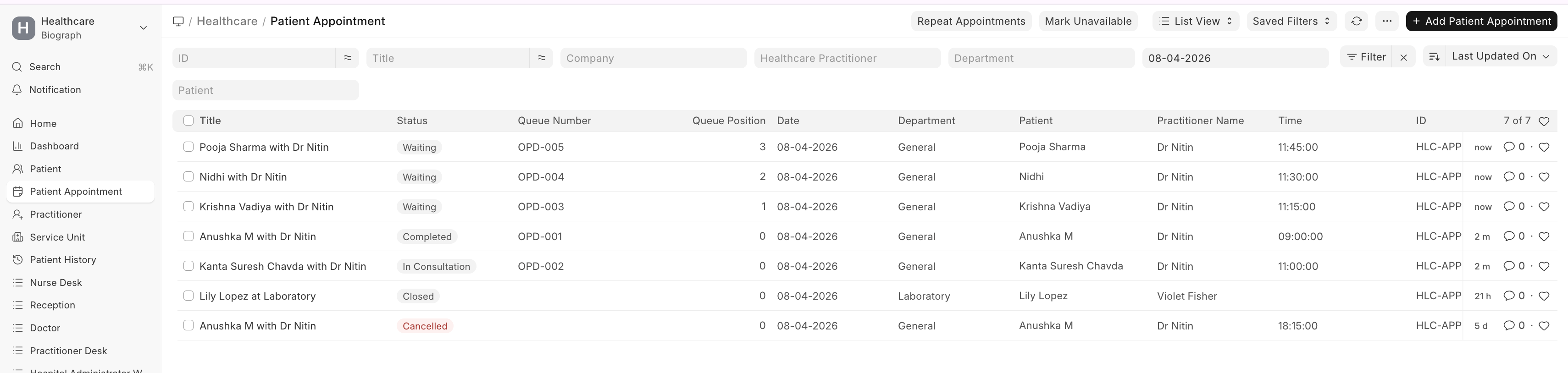
Reception dashboard highlights the next patients in queue:
- Shows upcoming patients for each doctor
- Helps staff call the next patient quickly
- Provides quick visibility of queue flow
Queue Status View
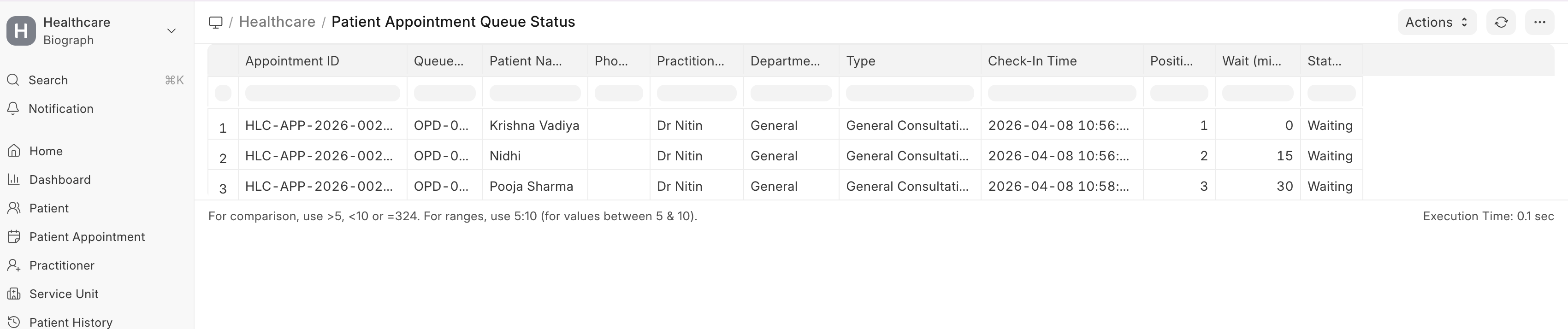
A dedicated Queue Status View provides:
- Full list of patients in queue
- Their positions and wait time
- Practitioner-wise queue tracking
Useful for:
- Reception staff
- Hospital administrators
- Monitoring patient flow
Key Benefits
- Reduces patient waiting confusion
- Improves doctor workflow
- Enables real-time tracking
- Enhances patient experience
- Supports operational efficiency
Important Notes
- Queue starts only after Check-In
- Cancelled or completed patients are removed from queue
- Queue is maintained per practitioner
- Multiple practitioners maintain separate queues