

Appearance
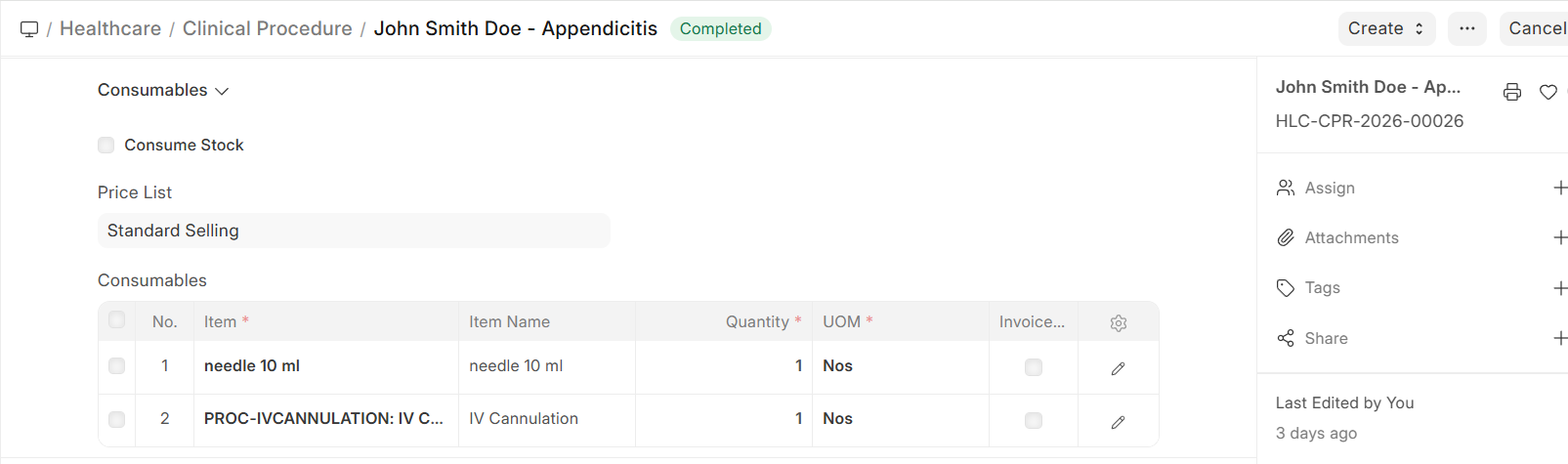
Procedure Consumables & Billing
Consumables Management
Tracking consumables used during procedures is essential for:
- Accurate billing — Charge patients for materials used
- Inventory management — Maintain adequate stock levels
- Cost analysis — Understand the true cost of each procedure
How Consumables Work
- Template defines defaults — The procedure template lists standard consumables
- Adjust at procedure time — The practitioner can add or remove items based on actual usage
- Stock integration — When ERPNext Stock module is configured, consumables are automatically deducted from the service unit's warehouse
- Billing integration — Consumable costs can be added to the patient's invoice
Procedure Billing
Procedures are billed through the ERPNext invoicing system:
| Billing Component | Source |
|---|---|
| Procedure charge | From the procedure template's linked Item and Rate |
| Consumables | Individual item charges from the consumables list |
| Practitioner fee | If the performing practitioner has separate charges |
Billing Flow
- Procedure is ordered from a Patient Encounter → Invoice line item can be created
- Procedure is completed and submitted → Consumables are finalized
- Sales Invoice includes the procedure charge and consumable costs
- Payment is processed through ERPNext Payment Entry
Tip: For procedures ordered from an encounter, the billing can be automated — the system creates the invoice item when the procedure order is placed, not when the procedure is performed.